
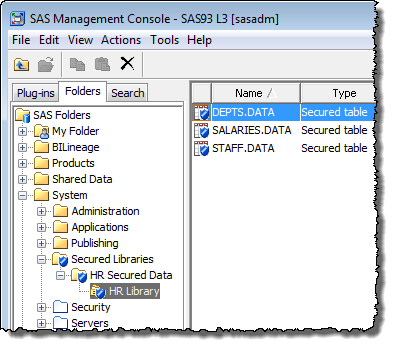
A little while ago, as part of the work on our recent Metacoda Plug-ins 3.0 R2 release, I used SAS® 9.3 M2 to set up a metadata bound library by following the useful instructions in the Setting Up a Metadata-Bound Library section of the SAS® 9.3 Guide to Metadata-Bound Libraries document. This post is about verifying that, post-setup, I no longer had direct access to the tables in the library.
Metadata bound libraries allow you to force clients to visit the SAS Metadata Server first, before they can gain access to the contents of the tables in the library. This gives the metadata server the opportunity to verify appropriate metadata access permissions. Direct access to those secured libraries and tables from Base SAS, without a visit to the metadata server, will be blocked. I first heard about metadata bound libraries at the SAS Global Forum in April this year and had been looking forward to trying them out. If you’re interested in them as well I recommend reading the documentation. Andy Ratcliffe wrote a NOTE: blog post about them recently too. If you don’t yet read Andy’s NOTE: blog I’d definitely recommend adding it to your RSS reader, and he also wrote a post last week about RSS in How Do You Read?.
This is the code I use to configure the metadata bound library (not the real pwencoded password):
libname hr '/opt/sas93m2/config/Lev3/SASApp/Data/HR';
proc authlib library=hr;
create
   securedfolder='/System/Secured Libraries/HR Secured Data'
   securedlibrary='HR Library'
   pw='{SAS002}ABCABCABCABCABCABCABCABC'
   ;
run;
After configuring the metadata bound library I wanted to verify that it had worked and that I hadn’t missed any steps. I wanted to check that the physical tables had been modified in such a way to prevent direct access from SAS processes that attempted to bypass the metadata server and go direct to the tables themselves.
All of the SAS versions I tried prior to SAS 9.3 M2 generated an error about the fact that the tables were inaccessible because they were from a more recent version of SAS (i.e. from the future). Direct non-metadata access from SAS 9.3 M2 generated an error indicating that access was not possible because a secured library object was not available for use. This was the anticipated result and confirmed that I had configured it correctly.
For reference, and to help with possible future troubleshooting, here are the SAS log fragments from those attempts using a variety of SAS versions, together with the associated error messages (as expected).
SAS 9.1.3 SP4
NOTE: Copyright (c) 2002-2003 by SAS Institute Inc., Cary, NC, USA.
NOTE: SAS (r) 9.1 (TS1M3)
...
NOTE: (E9BX05) SAS 9.1.3 SP 4
...
1    libname hr '/opt/sas93m2/config/Lev3/SASApp/Data/HR';
NOTE: Libref HR was successfully assigned as follows:
      Engine:        V9
      Physical Name: /opt/sas93m2/config/Lev3/SASApp/Data/HR
2    proc print data=hr.salaries;
ERROR: Member HR.SALARIES.DATA was created by a more recent release of SAS and cannot be accessed
       by this release.
3    run;
SAS 9.2 M3
NOTE: Copyright (c) 2002-2008 by SAS Institute Inc., Cary, NC, USA.
NOTE: SAS (r) Proprietary Software 9.2 (TS2M3)
...
1    libname hr '/opt/sas93m2/config/Lev3/SASApp/Data/HR';
NOTE: Libref HR was successfully assigned as follows:
      Engine:        V9
      Physical Name: /opt/sas93m2/config/Lev3/SASApp/Data/HR
2    proc print data=hr.salaries;
ERROR: Member HR.SALARIES.DATA was created by a more recent release of SAS and cannot be accessed
       by this release.
3    run;
SAS 9.3 M1
NOTE: Copyright (c) 2002-2010 by SAS Institute Inc., Cary, NC, USA.
NOTE: SAS (r) Proprietary Software 9.3 (TS1M0 MBCS3060)
...
1    libname hr '/opt/sas93m2/config/Lev3/SASApp/Data/HR';
NOTE: Libref HR was successfully assigned as follows:
      Engine:        V9
      Physical Name: /opt/sas93m2/config/Lev3/SASApp/Data/HR
2    proc print data=hr.salaries;
ERROR: Member HR.SALARIES.DATA was created by a more recent release of SAS and cannot be accessed by this release.
3    run;
SAS 9.3 M2
NOTE: Copyright (c) 2002-2010 by SAS Institute Inc., Cary, NC, USA.
NOTE: SAS (r) Proprietary Software 9.3 (TS1M2 MBCS3060)
...
1    libname hr '/opt/sas93m2/config/Lev3/SASApp/Data/HR';
ERROR: The secured library object information for library HR could not be obtained from the metadata server or has invalid data.
ERROR: The connection to the metadata server could not be made.
ERROR: Insufficient information provided for a connection to the metadata server.
ERROR: Error in the LIBNAME statement.
2    proc print data=hr.salaries;
ERROR: Libname HR is not assigned.
3    run;
I updated the post to add a proc authlib code sample.
Great summary Paul. A year later, I finally managed to add a post of my own on this topic: Closing the “LIBNAME loophole” with metadata-bound libraries.
Thanks Chris. That’s a great post and thanks for the mention too. I’ve always admired the knack you have for explaining complex topics in terms of people’s real world experiences so it’s easy to understand.
BTW If you haven’t seen it you might also be interested in a more recent post I did on using the new SAS 9.4 point and click method for defining metadata bound libraries: Creating a Metadata Bound Library with SAS 9.4