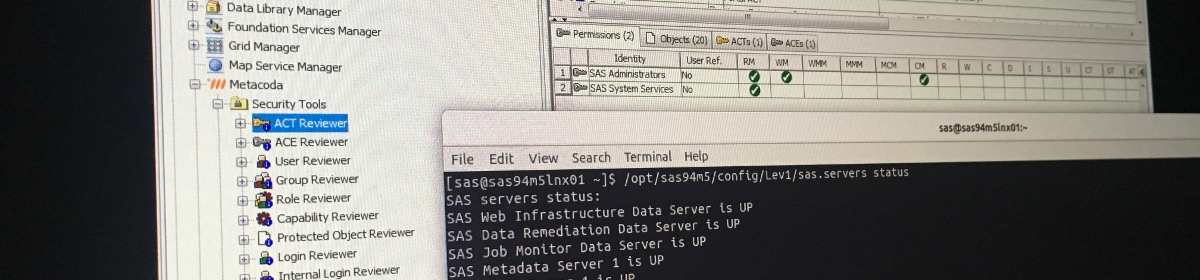
As mentioned in my previous post, Duplicating or Copying SAS Access Control Templates, Metacoda Plug-ins 6.1 R3 also includes support for duplicating users in SAS metadata. Metacoda customers have often asked us for the ability to create a new user just like another user. Primarily, this is to give a new user the same, or similar, access as an existing user in the same job role. In a well set up SAS metadata security implementation, this is usually as simple as making them a member of the same groups and/or roles and that is one of the main aspects of this new duplicate-user feature. Continue reading “Duplicating or Copying SAS Users”
Tag: SAS
Duplicating or Copying SAS Access Control Templates
When working with SAS® 9 metadata security, I often want to create an Access Control Template (ACT) which is very similar to an existing ACT. It may be that it will have a similar definition or permission pattern. It will usually have the same access controls applied to it for its own protection. It might occasionally be applied to protect the same set of objects as the original ACT.
Duplicating or copying SAS metadata security objects, such as ACTs, users, groups, and roles, has been a common request from Metacoda customers too. For this reason we added duplication support in Metacoda Plug-ins 6.1 R3. In the ACT, User, Group, and Role Reviewer plug-ins you will find a new Duplicate… action in the the context menu seen when right-mouse clicking over an object. A pop-up dialog then gives you some options to control what is duplicated.
The ability to duplicate objects via this facility is limited to SAS administrators via membership of one the standard SAS metadata server roles (i.e. “Metadata Server: Unrestricted“, “Metadata Server: User Administration“, or “Metadata Server: Operation“). Of course you also need permission to view the object you are duplicating. Continue reading “Duplicating or Copying SAS Access Control Templates”
Metacoda Identity Sync and Microsoft Security Advisory ADV190023
Those of you who use Metacoda Identity Sync may have already heard about Microsoft Security Advisory ADV190023. You may have heard about it from Stuart Rogers’ post on SAS Communities: SAS Viya The Importance of LDAP Encryption. Stuart’s article is about SAS Viya, but the Microsoft changes may have an impact on those sites that do LDAP-based identity synchronization with their SAS 9 platforms too. This includes Metacoda customers that use Metacoda Identity Sync. Naturally, this is something we have been getting some questions about recently – “How will it impact on the identity sync process?”
I think a good place to start would be to read the linked articles above, then discuss with your domain admins. They will be able to tell you if they plan on making the recommended changes and, if so, when they plan to make them. This might require you to change the way you configure your LDAP connection.
There has been some confusion about what changes Microsoft will make and when. It also looks like the extent and timing of those changes has evolved over time too. Quoting some of the sections of the advisory, as of today: Continue reading “Metacoda Identity Sync and Microsoft Security Advisory ADV190023”
Reviewing SSL/TLS Certificate Chain for Active Directory Server
Sometimes when I am setting up, or helping someone setup, identity synchronisation between the SAS® platform and Microsoft Active Directory (AD), I run into SSL/TLS certificate validation issues. I am usually using Metacoda Identity Sync, but it can also happen when doing a sync with custom Base SAS code. Often the underlying cause is that the AD server’s CA certificate is not in the SAS Private JRE Trusted CA Bundle (see Did I add that CA Certificate to the SAS Trusted CA Bundle?). When troubleshooting this, one of the first things I will do is look at the certificate that the AD server is providing, and I mostly use an OpenSSL s_client command for this. There are 4 command variations I use depending on whether I am trying to use the main directory or the global catalog, and with LDAP plus STARTTLS, or just LDAPS.
For connecting to the main directory on the unencrypted LDAP port 389 with an upgrade to encrypted using STARTTLS:
echo "Q" | openssl s_client -connect dc.example.com:389 -starttls ldap -showcertsFor connecting to the main directory on the encrypted LDAPS port 636:
For connecting to the global catalog on the unencrypted port 3268 with an upgrade to encrypted using STARTTLS:
For connecting to the global catalog on the encrypted port 3269:
echo "Q" | openssl s_client -connect gc.example.com:3269 -showcertsIf you want to examine the returned certificate in more detail then you can also pipe it to an OpenSSL x509 command e.g.
echo "Q" | openssl s_client -connect dc.example.com:389 -starttls ldap -showcerts | openssl x509 -noout -textIf you have questions, or any other tips for troubleshooting SSL/TLS certificates with AD, then please leave a comment below.
Adding Metacoda Custom Tasks Capabilities for SAS Enterprise Guide
When you install Metacoda Custom Tasks for use in SAS® Enterprise Guide® and the SAS® Add-In for Microsoft Office you may find you don’t see the new menu items you expected in the Tools menu:
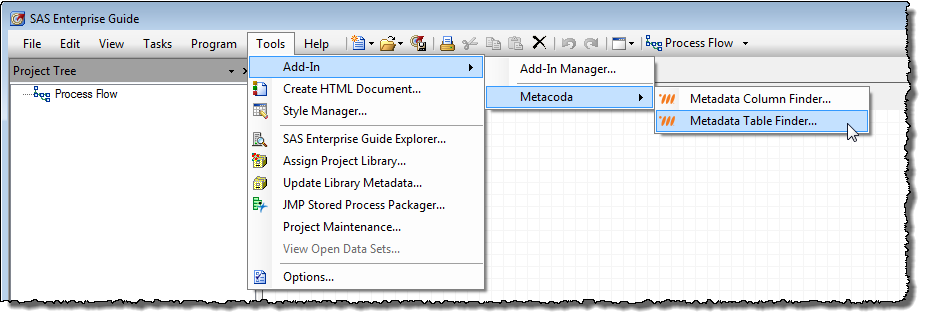
There are 2 main reasons why they may be missing: 1) the custom tasks could not be loaded, perhaps due to an issue during installation; and 2) you are not being granted access to the custom tasks due to your metadata roles and capabilities. The first issue is usually quite easy to resolve. This post is about the second scenario because it can be somewhat harder to troubleshoot.
Roles and capabilities are used in the SAS platform to control access to SAS application features such as menu items in SAS Enterprise Guide. In a new SAS platform installation the PUBLIC group (which includes everyone) is a member of the Enterprise Guide: Advanced role, and that role grants all capabilities for SAS Enterprise Guide. That means, by default, all users have access to all of the controllable features in SAS Enterprise Guide. Some SAS customers change this, as may be required for their security plan, by removing the PUBLIC group and replacing it with more appropriate groups for their environment, and perhaps create additional roles with the required capabilities. It is in this scenario where you may find your capability set is preventing access to the Metacoda Custom Tasks. Continue reading “Adding Metacoda Custom Tasks Capabilities for SAS Enterprise Guide”